

Ideal Final State
As previously mentioned, we want to implement a virtual currency system with a balance, daily, and gamble system. For this we will leverage DynamoDB, AWS’ fully managed NoSQL database service.


Functionality wise we want the ability to:
- Create or get a user
- Get a user’s balance
- Set a user’s balance
- Gamble with a user’s balance
- Daily reward for a user
Table Structure
We will have a users table with the following attributes:
- User ID
- Guild ID
- Balance
- Last Daily Claim
We will use the User ID as the partition key and Guild ID as the sort key.
Definition (What are Partition and Sort Keys?)
In DynamoDB, a partition key determines where your data is physically stored and distributed across servers, while a sort key allows you to store multiple items with the same partition key in sorted order.
When you combine them into a composite primary key—like using User ID as the partition key and Guild ID as the sort key—both values become required for every item, and together they must be unique. This design is perfect for one-to-many relationships like ours where all guilds for a specific user are stored together on the same partition, sorted by Guild ID, which makes queries like “get all guilds for this user” incredibly fast and efficient. You can retrieve a specific user-guild combination by providing both keys, or query all guilds for a user by providing just the partition key.
Adding Table to SST
The beauty about NoSQL databases is that they are schema-less, which means you can change the setup at any point. This is in contrast to traditional SQL databases, which require you to define a schema upfront. For us this means all we need to define is the partition key and the sort key, everything else is just added on demand!
We will also need to link the users table to lambda function so that the function can have permissions to the table (which SST will handle for us).
/// <reference path="./.sst/platform/config.d.ts" />
export default $config({ app(input) { return { name: "serverless-bot", removal: input?.stage === "production" ? "retain" : "remove", protect: ["production"].includes(input?.stage), home: "aws", }; }, async run() { const botToken = new sst.Secret("DiscordBotToken"); const appId = new sst.Secret("DiscordAppId"); const publicKey = new sst.Secret("DiscordPublicKey");
const usersTable = new sst.aws.Dynamo("Users", { fields: { userId: "string", guildId: "string", }, primaryIndex: { hashKey: "userId", rangeKey: "guildId", }, });
new sst.aws.Function("DiscordInteractionHandler", { handler: "lambdas/interaction.handler", url: true, link: [usersTable], environment: { DISCORD_TOKEN: botToken.value, DISCORD_APP_ID: appId.value, DISCORD_PUBLIC_KEY: publicKey.value, }, }); },});As always, just go ahead and npx sst deploy to deploy your changes!
New Balance Command
Let’s get rolling with a new balance command, but we will need a couple packages and some setup. In this case we will use the @aws-sdk/client-dynamodb package to interact with DynamoDB. We’ll also use date-fns to handle date and time operations more reliably.
npm install @aws-sdk/client-dynamodb date-fnsDynamo Utilities
We will also want some DynamoDB utilities to just make our lives easier.
import { DynamoDBClient, PutItemCommand, QueryCommand,} from "@aws-sdk/client-dynamodb";import { Resource } from "sst";
const client = new DynamoDBClient();const usersTableName = Resource.Users.name;
export async function getUser(userId, guildId) { const command = new QueryCommand({ TableName: usersTableName, KeyConditionExpression: "userId = :userId AND guildId = :guildId", ExpressionAttributeValues: { ":userId": { S: userId }, ":guildId": { S: guildId }, }, });
const { Items } = await client.send(command);
return Items?.[0] ?? null;}
export async function createUser(user, guildId) { const putCommand = new PutItemCommand({ TableName: usersTableName, Item: { userId: { S: user.id }, guildId: { S: guildId }, // Default starting balance balance: { N: '1000' }, lastDaily: { N: "0" }, }, });
await client.send(putCommand);}
export async function getOrCreateUser(user, guildId) { const dbUser = await getUser(user.id, guildId);
if (dbUser) { return dbUser; }
await createUser(user, guildId); return await getUser(user.id, guildId);}
export async function updateUser(user, update) { const command = new PutItemCommand({ TableName: usersTableName, Item: { ...user, ...update, }, });
await client.send(command);}The New Command
We will now create a new command that will display the user’s balance using our handy DynamoDB utilities.
import type { CommandConfig, CommandInteraction } from "dressed";import { getOrCreateUser } from "../../utilities/dynamodb";
export const config = { description: "Balance", integration_type: "Guild", contexts: ["Guild"], guilds: ["YOUR_GUILD_ID"],} satisfies CommandConfig;
export default async function(interaction: CommandInteraction) { const user = await getOrCreateUser(interaction.user, interaction.guild!.id); const balance = user.balance?.N ?? 0;
return interaction.reply(`Your current balance is $${balance}`);}Deploying the New Command
Now that we’re using DynamoDB, we need to use the npm scripts we set up in Part 2. The sst shell wrapper ensures that linked resources like our DynamoDB table are available during the build process.
Deploy your changes:
npm run deployRegister the new command with Discord:
npm run registerAt this point, you should be able to use your fancy new /balance command in your Discord server.

Exploring the DynamoDB Table
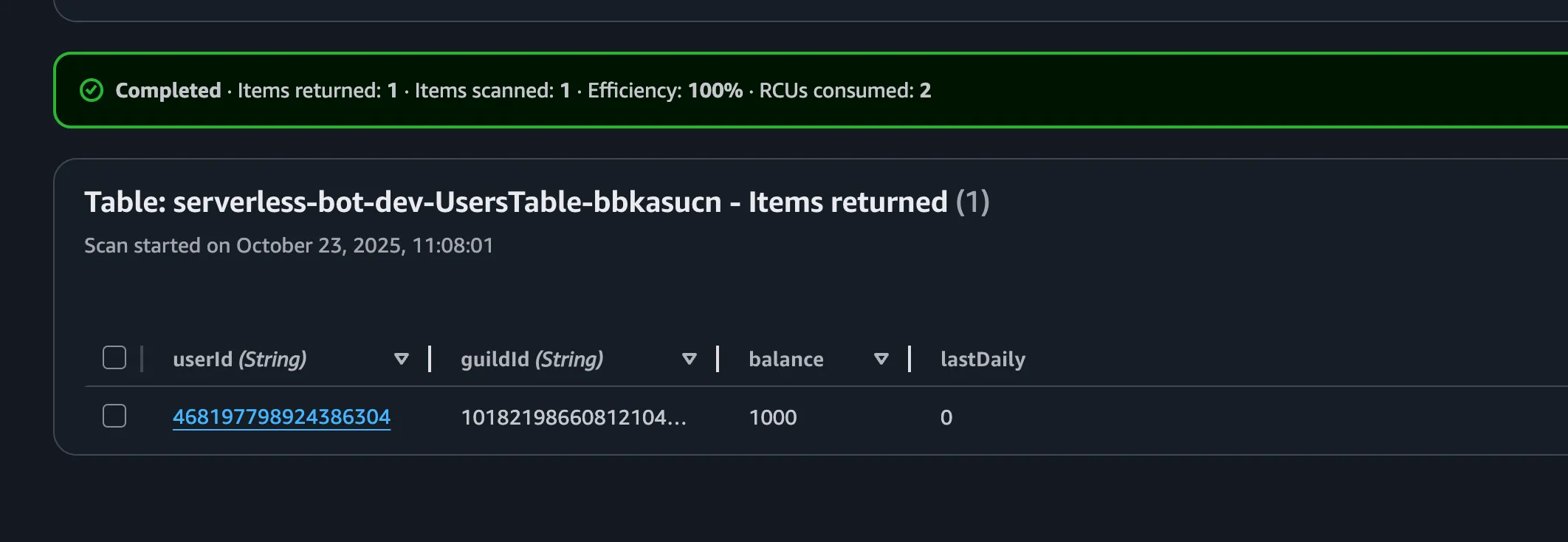
You should be able to go directly to the DynamoDB Console and you should see a new table for your project. If you click into it and explore the items you should also see your new user entry.
Daily Command
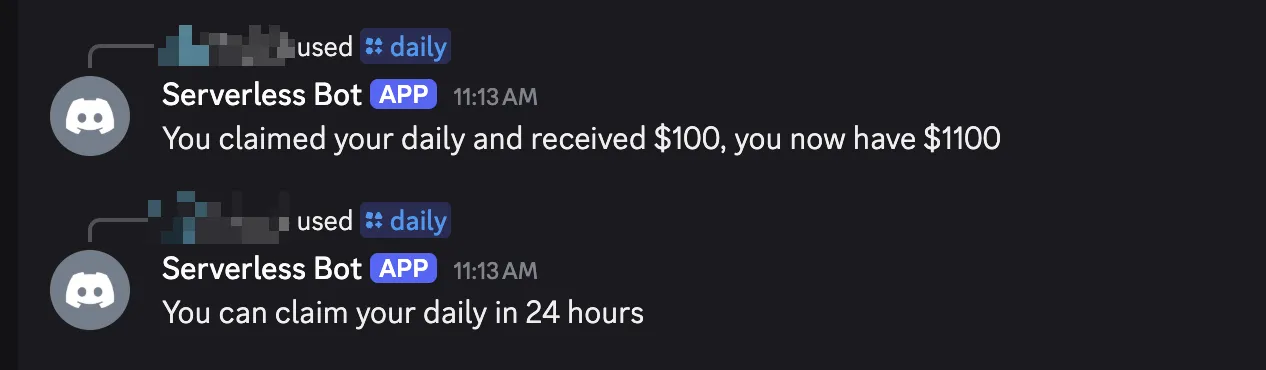
We have all the scaffolding we need to do a daily command. However we have a couple specific requirements for a daily, mainly the user can only claim a daily every 24 hours, for this we will leverage date-fns to handle the date logic.
import { differenceInHours, getTime, subHours } from "date-fns";import type { CommandConfig, CommandInteraction } from "dressed";import { getOrCreateUser, updateUser } from "../../utilities/dynamodb";
export const config = { description: "Daily", integration_type: "Guild", contexts: ["Guild"], guilds: ["YOUR_GUILD_ID"],} satisfies CommandConfig;
export default async function(interaction: CommandInteraction) { const user = await getOrCreateUser(interaction.user, interaction.guild!.id); const dailyAmount = 100; const now = Date.now(); const lastDaily = getTime( Number(user?.lastDaily?.N) < 1 ? subHours(new Date(), 25) : Number(user?.lastDaily?.N) );
if (differenceInHours(now, lastDaily) < 24) { const hoursRemaining = Math.ceil(24 - differenceInHours(now, lastDaily)); return interaction.reply(`You can claim your daily in ${hoursRemaining} hours`); }
const newBalance = Number.parseInt(user?.balance?.N ?? "0", 10) + dailyAmount;
await updateUser(user, { lastDaily: { N: now.toString() }, balance: { N: newBalance.toString() }, });
return interaction.reply( `You claimed your daily and received $100, you now have $${newBalance}` );}You’ll see us taking full advantage of our utilities here as we get the user, check their last daily, and if they can claim their daily, we update their balance and last daily timestamp.
Now just:
npm run register && npm run deployAnd you’ll have your daily up and running!
High Risk, High Reward. Our Gamble Command
Next up, a gamble command! Again, we’ll use the same utilities we’ve been using so far. We’ll also take advantage of Dressed’s built in options to allow people to place custom bets.
First, install the Discord API types package we’ll need:
npm install discord-api-typesNow create the gamble command:
import { MessageFlags } from "discord-api-types/v10";import { ActionRow, Button, type CommandConfig, type CommandInteraction, CommandOption, TextDisplay,} from "dressed";import { getOrCreateUser, updateUser } from "../../utilities/dynamodb";
export const config = { description: "Gamble", integration_type: "Guild", contexts: ["Guild"], guilds: ["YOUR_GUILD_ID"], options: [ CommandOption({ name: "bet", description: "Amount to gamble", type: "Integer", required: false, }), ],} satisfies CommandConfig;
export default async function(interaction: CommandInteraction) { const user = await getOrCreateUser(interaction.user, interaction.guild!.id); // 100 is our minimum bet const bet = interaction.getOption("bet")?.integer() ?? 100; const balance = Number.parseInt(user?.balance?.N ?? "0", 10);
if (bet < 100) { return interaction.reply({ content: `You must bet at least $100.`, ephemeral: true, }); }
if (bet > balance) { return interaction.reply({ content: `You don't have enough to gamble! You need at least $${ bet - balance }.`, ephemeral: true, }); }
const result = Math.random() > 0.75 ? bet * 3 : -bet; const newBalance = balance + result; await updateUser(user, { balance: { N: newBalance.toString() } });
return interaction.reply({ components: [ TextDisplay( `You gambled $${bet} and ${result > 0 ? "won" : "lost"} $${Math.abs( result )}. You now have $${newBalance}` ) ], flags: MessageFlags.IsComponentsV2, });}Easy Re-Gamble

We can also add a button that allows us to re-gamble without having to type the command again.
return interaction.reply({ components: [ TextDisplay( `You gambled $${bet} and ${result > 0 ? 'won' : 'lost'} $${Math.abs(result)}. You now have $${newBalance}`, ), ActionRow( Button({ label: `Gamble Again ($${bet})`, custom_id: `gamble-again-${bet}`, }), ), ], flags: MessageFlags.IsComponentsV2,})To make this work…we need a new component to handle the button click.
import { ActionRow, Button, type MessageComponentInteraction, TextDisplay,} from "dressed";import { getOrCreateUser, updateUser } from "../../../utilities/dynamodb";
export const pattern = `gamble-again-:amount(\\d+)`;
export default async function( interaction: MessageComponentInteraction, args: { amount: number }) { const user = await getOrCreateUser(interaction.user, interaction.guild!.id); const amountToGamble = args.amount ?? 100; const balance = Number.parseInt(user?.balance?.N ?? "0", 10);
if (amountToGamble > balance) { return interaction.update({ components: [ TextDisplay( `You don't have enough to gamble! You need at least $${ amountToGamble - balance } more.` ), ], }); }
const result = Math.random() > 0.75 ? amountToGamble * 3 : -amountToGamble; const newBalance = balance + result;
await updateUser(user, { balance: { N: newBalance.toString() } });
return interaction.update({ components: [ TextDisplay( `You gambled $${amountToGamble} and ${ result > 0 ? "won" : "lost" } $${Math.abs(result)}. You now have $${newBalance}` ), ActionRow( Button({ label: `Gamble Again ($${amountToGamble})`, custom_id: `gamble-again-${amountToGamble}`, }) ), ], });}Now we have the ability to keep on gambling!
Wrapping Up
Now you’ve got a fully functional, no cost, serverless Discord bot that requires no server to run. You can leverage any of the AWS services to continue iterating and expanding the functionality of your bot.
What’s Next?
Here are some ideas to expand your bot:
More Commands
- Leaderboards using DynamoDB queries
- Trading between users
- Daily streaks with bonus rewards
- More gamble commands such as blackjack, slots, and more
Resources
If you’ve gotten this far, thank you! I appreciate all you’ve gone through and would appreciate a share on social media!